
How7o
  • Home
  • Marketing
    MarketingShow More
    The Beginner’s Guide about Facebook Advertising
    6 Min Read
    64 Creative Marketing Ideas to Boost Your Business
    6 Min Read
  • Resouce
    ResouceShow More
    5 Must-Have Digital Marketing Data Sources
    6 Min Read
    Archival Solution Deployment Best Practices
    6 Min Read
    How Secure Your Mobile Device in Six Steps
    6 Min Read
    5 Effective Ways to Increase Market Share Online
    6 Min Read
    Tips Debugging with CMS code Optimization Quick
    6 Min Read
  • Features
    FeaturesShow More
    7 Things You Need to Know About Feature Driven
    6 Min Read
    Turn an Excel Spreadsheet or Google Sheets Doc
    6 Min Read
    3 Common Ways to Forecast Currency Exchange
    6 Min Read
    Step by Step Guide to a Technical SEO Audit
    6 Min Read
    10+ Free Tools to Make Your Own Animated GIFs
    6 Min Read
  • Guide
    GuideShow More
    Create an Engagement Custom Audience from Video
    6 Min Read
    The Ultimate Guide, Easily Make Videos Tutorials
    6 Min Read
    Tips to Keep Your Cloud Storage Safe and Secure
    6 Min Read
  • Contact
  • Blog
Reading: Create a Directory in Ubuntu (mkdir Command + Examples)
Share
Subscribe Now
How7oHow7o
Font ResizerAa
  • Marketing
  • Resouce
  • Features
  • Guide
  • Complaint
  • Advertise
Search
  • Categories
    • Marketing
    • Resouce
    • Features
    • Guide
    • Lifestyle
    • Wellness
    • Healthy
    • Nutrition
  • More Foxiz
    • Blog Index
    • Complaint
    • Sitemap
    • Advertise
Follow US
Copyright © 2014-2023 Ruby Theme Ltd. All Rights Reserved.
How7o > Blog > Server Management > Create a Directory in Ubuntu (mkdir Command + Examples)
Server Management

Create a Directory in Ubuntu (mkdir Command + Examples)

how7o
By how7o
Last updated: January 12, 2026
4 Min Read
Create a Directory in Ubuntu
SHARE

I still remember the first time I tried to “organize my files properly” on an Ubuntu server. I SSH’d into my VPS, ran cd projects, and Ubuntu hit me with: No such file or directory. That’s when I realized I hadn’t even created the folder yet.

Contents
  • What command creates a folder in Ubuntu?
  • 1) Create a directory in the current location
  • 2) Create a directory using an absolute path
  • 3) Create nested directories in one command (mkdir -p)
  • 4) Create multiple directories at once
  • 5) Create a directory with spaces in the name
  • 6) Set permissions while creating the directory (mkdir -m)
  • Common mkdir errors (and fixes)
    • “No such file or directory”
    • “Permission denied”
    • “File exists”
  • Outbound + internal links (helps Yoast)
  • Final thoughts

So in this guide I’ll show you exactly how to create a directory in Ubuntu using the terminal—starting from the simplest mkdir command, then moving into the real-life stuff (nested folders, spaces in names, permissions, and common errors).

Tip for Yoast: if you add a featured image and an in-post image, use alt text like “create a directory in Ubuntu using mkdir”.

What command creates a folder in Ubuntu?

The command you want is mkdir (short for “make directory”). Your original post already shows the two most common uses: create in the current folder, or create using a full path. :contentReference[oaicite:1]{index=1}

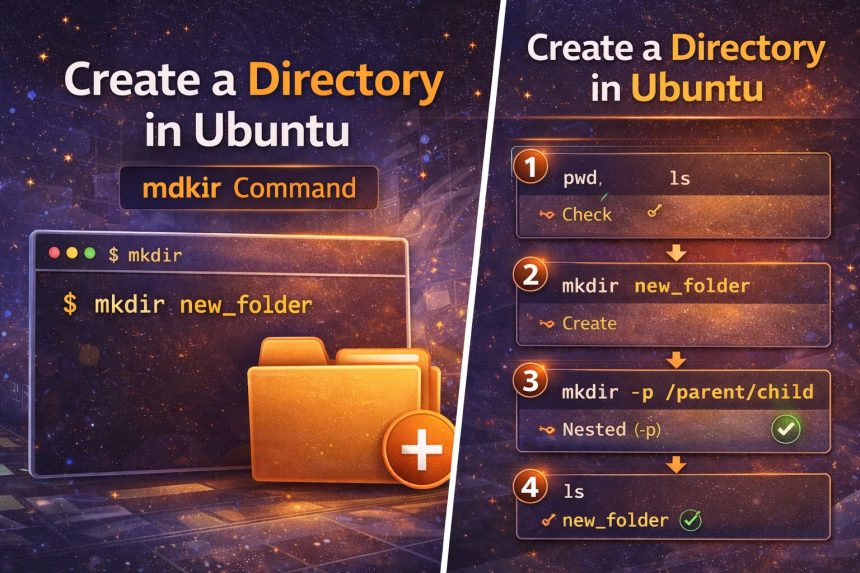
1) Create a directory in the current location

First, check where you are:

pwd
ls

Now create a folder right here:

mkdir my_folder

Confirm it exists:

ls

2) Create a directory using an absolute path

If you want to create the directory somewhere else, use the full path (this is the example from your original post): :contentReference[oaicite:2]{index=2}

mkdir /home/user/Documents/my_folder

This works as long as the parent folder already exists and you have permission to write there.

3) Create nested directories in one command (mkdir -p)

This is the option I use the most in real projects. The -p flag creates missing parent directories automatically and won’t error if the directory already exists. :contentReference[oaicite:3]{index=3}

mkdir -p ~/projects/how7o/wordpress/posts

Without -p, Ubuntu will fail if ~/projects/how7o doesn’t exist yet.

4) Create multiple directories at once

You can create several folders in one go by listing them:

mkdir images backups logs

If you want a nice structure in one command, brace expansion is a time-saver (example format): :contentReference[oaicite:4]{index=4}

mkdir -p project/{src,public,logs,backups}

5) Create a directory with spaces in the name

Spaces are fine, but you must quote the name (or escape spaces) or Ubuntu will treat them as separate folders.

mkdir "My New Folder"

6) Set permissions while creating the directory (mkdir -m)

If you want to create a folder with specific permissions, use -m (mode). :contentReference[oaicite:5]{index=5}

# example: owner can read/write/execute, group and others can read/execute
mkdir -m 755 my_secure_folder

If you’re not sure what 755 means, think: owner full access, everyone else read/execute.

Common mkdir errors (and fixes)

“No such file or directory”

You’re trying to create a folder inside a path that doesn’t exist yet. Fix: use -p.

mkdir -p /some/missing/path/newfolder

“Permission denied”

You don’t have permission to write in that parent directory. Either create it somewhere you own (like ~/), or use sudo only when it makes sense:

sudo mkdir /opt/myapp

“File exists”

The folder already exists. If you want “no error”, use mkdir -p.

Outbound + internal links (helps Yoast)

  • GNU Coreutils: mkdir documentation
  • Ubuntu manpage: mkdir
  • Automatic logout timeout in Ubuntu terminal
  • Change welcome message on Ubuntu VPS

Final thoughts

Once you learn mkdir, you start using it everywhere—projects, backups, logs, scripts, deployments. If you remember just one thing, make it this: use mkdir -p for nested paths. It prevents the most common beginner error and makes your commands repeatable.

TAGGED:BeginnersCommand LineFile SystemLinuxmkdirSSHterminalUbuntuvps

Sign Up For Daily Newsletter

Be keep up! Get the latest breaking news delivered straight to your inbox.
By signing up, you agree to our Terms of Use and acknowledge the data practices in our Privacy Policy. You may unsubscribe at any time.
Share This Article
Facebook Copy Link Print
Previous Article Update Ubuntu to the latest kernel version Update Ubuntu to the Latest Kernel Version (Safe Server Steps)
Next Article Automatic logout timeout for command line in Ubuntu (TMOUT 300s) Automatic Logout Timeout for Command Line in Ubuntu (TMOUT 300s)
Leave a Comment

Leave a Reply Cancel reply

Your email address will not be published. Required fields are marked *

FacebookLike
XFollow
PinterestPin
InstagramFollow

Subscribe Now

Subscribe to our newsletter to get our newest articles instantly!
Most Popular
How I Fixed Composer Dependency Errors
How I Fixed Composer Dependency Errors Using the –ignore-platform-reqs Flag (Step-by-Step Guide)
January 12, 2026
Transfer Discourse to a new server
How to Transfer Discourse to a New Server on AlmaLinux (Backup + Restore, Step-by-Step)
January 12, 2026
Installed Discourse on AlmaLinux
How I Installed Discourse on AlmaLinux (Docker Method, Step-by-Step)
January 12, 2026
Installing Docker on AlmaLinux guide
Install Docker on AlmaLinux: Step-by-Step (Docker CE + Compose)
January 12, 2026
Change welcome message on Ubuntu VPS server (MOTD + SSH banner)
Change Welcome Message on Ubuntu VPS (MOTD + SSH Banner)
January 12, 2026

You Might Also Like

Check if GD library is installed in PHP (phpinfo and extension_loaded)
Web Development

How to Check if GD Library Is Installed in PHP (3 Easy Methods)

5 Min Read
Update Ubuntu to the latest kernel version
Server Management

Update Ubuntu to the Latest Kernel Version (Safe Server Steps)

5 Min Read
Automatic logout timeout for command line in Ubuntu (TMOUT 300s)
Server Management

Automatic Logout Timeout for Command Line in Ubuntu (TMOUT 300s)

5 Min Read

Always Stay Up to Date

Subscribe to our newsletter to get our newest articles instantly!
How7o

We provide tips, tricks, and advice for improving websites and doing better search.

Latest News

  • SEO Audit Tool
  • Client ReferralsNew
  • Execution of SEO
  • Reporting Tool

Resouce

  • Google Search Console
  • Google Keyword Planner
  • Google OptimiseHot
  • SEO Spider

Get the Top 10 in Search!

Looking for a trustworthy service to optimize the company website?
Request a Quote
Welcome Back!

Sign in to your account

Username or Email Address
Password

Lost your password?